Call for Testing: Jetpack 9.2

The beta for Jetpack 9.2  is available now, and the download link is at the top of the beta release notice.

Jetpack 9.2 will be deployed to VIP Go on Thursday, December 3, 2020. The upgrade is expected to be performed at 15:00 UTC (11:00am EDT). This deployment date and time are subject to change if issues are discovered during the testing of the Jetpack release.

What is being added or changed?

Blocks

We’ve made some changes to multiple blocks in this release, to ensure that they look good even outside of the WordPress context, such as in RSS feeds or subscription emails.

To test those changes, try the following:

  • Go to Jetpack > Settings
  • Enable the Subscriptions feature
  • Go to Posts > Add New
  • Add a subscription block, and publish the post.
  • Visit the post and subscribe to your own site with your own email address.
  • Publish a new post, with some content and the following blocks:
    • Podcast
    • Slideshow
    • Pinterest
    • Contact Form
    • Tiled Gallery

Make sure those blocks still look good on your site as well as in the subscription email you’ll receive.

Sync

With the introduction of the wp_after_insert_post hook in WordPress 5.6 we are migrating the jetpack_publish_post asction from wp_insert_post so that the action consistently triggers after saving meta and terms.

To ensure there is no regression issues we need to validate Publicize still triggers for newly published posts using both WP 5.5 and 5.6.

  • With WordPress 5.5 installed
  • Connect your site to Social Networks using the instructions at https://jetpack.com/support/publicize/
  • Go to Posts > Add New
  • Add Sample content, and customize the social message using the instructions at https://jetpack.com/support/publicize/#sharing-new-posts
  • Publish the post.
  • Confirm the custom message has been shared by visiting your social media accounts.
  • Upgrade your test site to WordPress 5.6
  • Repeat the above steps and ensure it is shared to your social networks.

The jetpack_publish_post action also is used to trigger updates to elastic content, so verifying new posts show up in Instant Search results is another great way to test this change.

A full list of changes is available in the release notes and the commit log.

What do I need to do?

We recommend:

  1. Installing the beta release on your non-production sites using these instructions.
  2. Running through the testing flows outlined in the Jetpack Testing Guide.

As you’re testing a few things to keep in mind:

  • Check your browser’s JavaScript console and see if there are any errors reported by Jetpack there.
  • Use “Debug Bar” or “Query Monitor” to help make PHP notices and warnings more noticeable and report anything you see.

Questions?

If you have testing feedback or questions related to this release (or Jetpack in general), please open a support ticket and we will be happy to assist.

Removing Gutenberg Ramp

UPDATE: On January 28, we announced an updated timeline for this deprecation. Due to a core bug, Deprecation has been delayed to February 22, and all outstanding Pull Requests will be merged on February 17.

Since its official release as part of WordPress 5.0 in December of 2018, the Gutenberg project has transformed what it’s like to create content and manage pages and sections.

While the Gutenberg Ramp plugin was initially created to allow WordPress VIP customers to have precise control over their editor experience, WordPress Core includes simple filters which provide this same control and allow for a more streamlined codebase. As a result, we will be removing the Gutenberg Ramp plugin from the mu (must-use) plugins set on February 3, 2021.

What does that mean for me?

The current Gutenberg Ramp experience requires site owners to opt in to use the Block Editor. Using the WordPress Core filters will move the Block Editor to on-by-default, while still allowing customers to easily opt out if they choose.

Starting today, any Administrators on your WordPress VIP site will begin to see a deprecation notice alerting them of the upcoming change. No action is required at this time, but if you’d like to preemptively address the change, see below for specific instructions.

What do I need to do?

You need to test:

While we’ll be proactively creating these Pull Requests in your repos, we highly recommend testing the changes prior to merging, especially when using the use_block_editor_for_post_type filter for a custom implementation.

If you’re already using the Gutenberg Block Editor:

Starting November 23, VIP will create Pull Requests on each environment branch of your GitHub repo. These Pull Requests will be customized depending on your current implementation, to ensure that your application continues to work as expected after the Gutenberg Ramp plugin is deprecated.

For customers who are using the Block Editor site-wide, the Gutenberg Ramp implementation will be replaced with the below snippet:

add_filter( 'use_block_editor_for_post', '__return_true' );

For customers with custom implementations of Gutenberg Ramp (e.g. limited to certain post types), the Pull Request will be configured to meet each specific use case, using a custom function along with the use_block_editor_for_post_type filter:

function maybe_load_gutenberg_for_post_type( $can_edit, $post_type ) {   
          $enable_for_post_types = [ 'post', 'page' ];
    if ( in_array( $post_type, $enable_for_post_types, true ) ) {
                return true;   
          }   

          return $can_edit;
}

add_filter( 'use_block_editor_for_post_type', 'maybe_load_gutenberg_for_post_type', 20, 2 );
If you’re not using the Gutenberg Block Editor:

Starting November 23, VIP will create Pull Requests on the environment branches of your GitHub repo, implementing the below snippet in your client-mu-plugins folder:

add_filter( 'use_block_editor_for_post', '__return_false' );

This filter will allow you to continue opting out of using the Block Editor, once the Gutenberg Ramp plugin is deprecated.

FAQ

Q: What if I don’t have a development team to support this change?

A: The VIP Team will be creating custom Pull Requests for each customer, based on their current implementations, and will also be merging these on customers’ behalf on February 3 where needed. If you have specific questions or concerns about the changes needed for your site, or how to test, please feel free to open a support ticket.

Q: What if we have a planned code freeze?

A: We have planned the below timeline to consider common code freeze periods, such as the upcoming Holidays. If you have specific questions or concerns about the timeframe, please feel free to open a support ticket.

Q: What’s wrong with the Gutenberg Ramp plugin? Why do we have to change?

A: The Gutenberg Ramp plugin has served as a consistent and reliable way for VIP customers to opt in to the Block Editor experience. As we have seen widespread adoption of and success with the Block Editor, we are taking this opportunity to fully endorse a Gutenberg-first experience in the Enterprise WordPress space. The bonus side-effect of this change is helping our customers clean up their code base, while removing some future technical debt.

Timeline

  • November 23, 2020

    Starting today, November 23, the VIP team will create Pull Requests on develop, preprod, and master branches for all customer repos, with the necessary changes for their specific implementation. These Pull Requests will allow you to test on each environment of your application, and merge with confidence that the change has been reviewed by the VIP Team.

  • February 3, 2021

    On February 3, any outstanding Pull Requests will be merged to remove dependencies on the Gutenberg Ramp plugin, and the plugin will be officially deprecated from VIP’s mu-plugins.

Further information

Gutenberg has offered a new approach to matching a team’s existing workflow, and allows editorial teams to work in the context of what their site and pages actually look like. And it has made a flexible, granular reusability of individual elements across projects and even across the community much more directly available.

With Gutenberg, we were able to publish a breaking news story in two minutes versus five minutes in Classic [WordPress]. The main reason for this is the reusable blocks which have been renamed ‘The Game Changer’.

— Joel Davies, Head of Editorial Operations with News UK

If you’d like to learn more about Gutenberg, you can review our documentation or our case study with News UK.

Questions?

If you have testing feedback or questions related to this release, please open a support ticket, and we will be happy to assist.

Notice: VIP Dashboard Updates

We’re happy to share some of the latest changes available in the VIP Dashboard:

View Monthly Usage

You can now view details about your organization’s monthly VIP usage. We currently show the last 30 days of aggregated HTTP Requests across all of your applications. We also display details of your uptime and ticket service level agreements.

This view is available on request for organization account owners and primary contacts, or others that they authorize. To find your account owner and primary contacts, use the People view. To request access to this view, please open a support ticket. You can read more about how we define usage metrics on VIP. 

Usage dashboard screenshot

Updates to IP-based Site Restriction

You can now quickly add multiple IP addresses to your IP Allow List in the VIP Dashboard. Simply enter a comma-separated list of IP addresses and select “Add”.

IP allow list screenshot

Read more about what you can do with the VIP Dashboard or login here.

If you have any questions about the VIP Dashboard or our other tools, please don’t hesitate to contact VIP Support or your Relationship Manager.

Call for Testing: WordPress 5.6 Release Candidate

WordPress 5.6 is scheduled for public release on Tuesday, December 8, 2020, and the 5.6 Release Candidate 1 (RC1) is now available for testing. We recommend clients review the changelog as part of their testing.

What is being added or changed?

We outlined some of the upcoming changes when the beta version was released. You may want to review the following changes:

Changes to jQuery

Developers will need to update jQuery dependencies in their themes and plugins in order to co-ordinate with a three-step plan to update the version of jQuery included in WordPress. This plan was announced by the Core WordPress Community team last June. The changes involved have been spread across three major releases and 10 months.

The three steps were as follows:

  1. Remove jQuery Migrate 1.x.
    This was completed in WordPress 5.5 (August, 2020).*
  2. Update to the latest version of jQuery (3.5.1) and add the latest version of jQuery Migrate (3.3.2). Update to the latest jQuery UI (1.12.1).
    This will be part of WordPress 5.6 (December, 2020).
  3. Remove jQuery Migrate completely.
    This is planned for WordPress 5.7 (March, 2021).

* Developers who did not upgrade in time for the removal of jQuery Migrate 1.x, and relied on the use of the jQuery Migrate Helper plugin instead, will need to complete that work, as well as the second step in this process.

Is there a plugin that I can use, instead of upgrading themes and plugins?

No. The jQuery Migrate Helper plugin will no longer mitigate against the jQuery changes in WordPress core, once WordPress 5.6 is released. In addition, jQuery Migrate 3.3.2 will not cover all the cases that jQuery Migrate 1.x did.

What changes do I make? How do I test?

The core team has provided some jQuery-related testing instructions and an overview of the changes necessary.

Testing with the Test jQuery Updates plugin

You may want to test locally using the Test jQuery Updates plugin. It is also possible to enable the plugin in non-production environment on the VIP Go platform. The plugin is enabled if the VIP_ENABLE_TEST_JQUERY_UPDATES constant is set. You can also use vip_load_test_jquery_updates in a query string.

Will my jQuery-dependent code work?

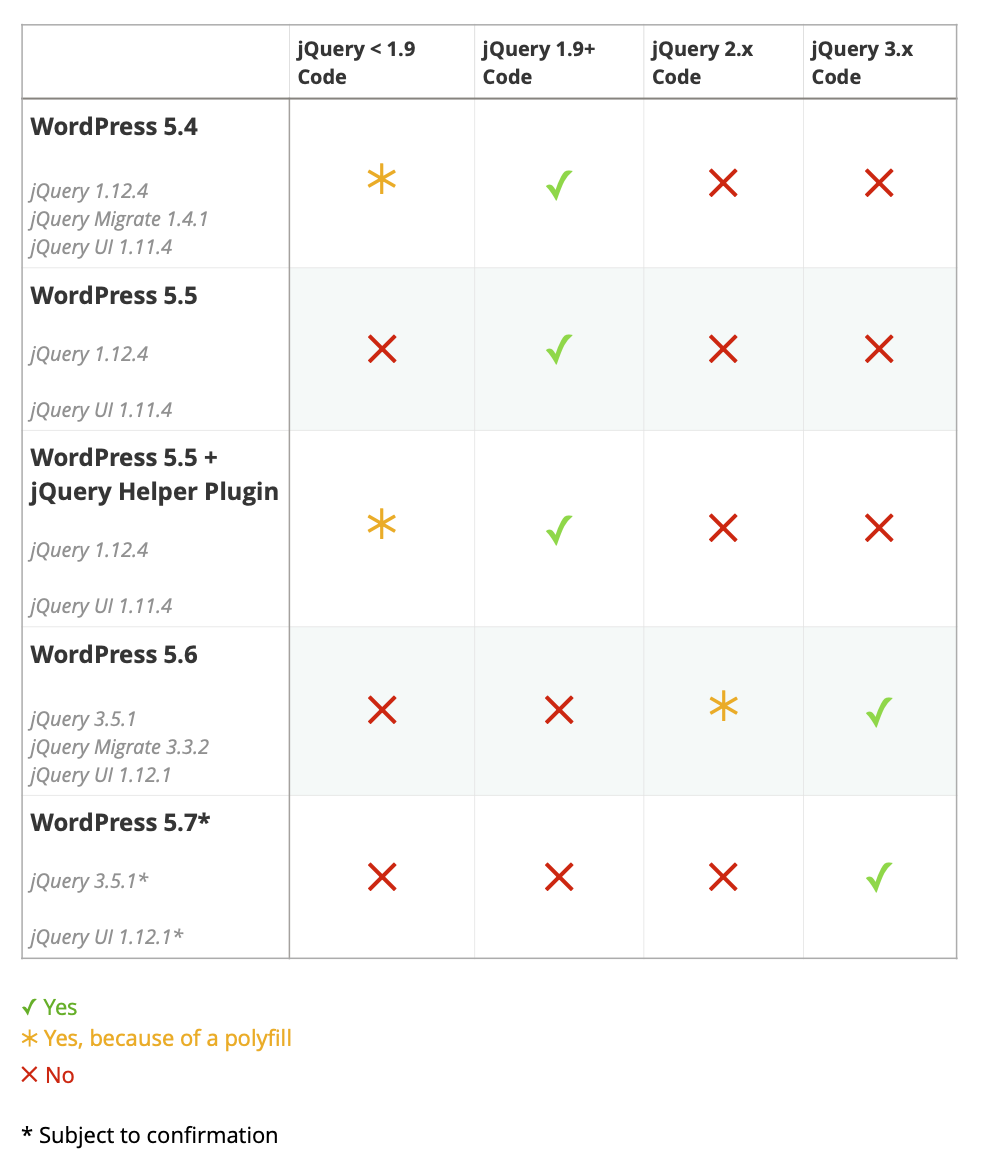
We’ve created a chart that summarizes which jQuery-dependent code is likely to work in WordPress 5.6, as compared to other versions of WordPress. Please note that this should be used for rough guidance. Testing is strongly recommended.

Will my code work?: jQuery changes in WordPress core versions

As this is a major upgrade to the jQuery library, please make sure you test your plugins and themes as thoroughly as possible before the release of WordPress 5.6 to avoid any preventable breakage.

Make WordPress Core

For a more detailed list of changes, see the RC 1 release announcement.

What do I need to do?

We recommend:

  1. Local development: Updating your local development environments to the release candidate using the Beta Tester plugin or updating it to track 5.6 (i.e. trunk) via either the Subversion or GitHub repos.
  2. Non-production environments: For sites on VIP Go, you can have your non-production sites switched to WordPress 5.6 now. If this is something you’re interested in, please open a ticket and we can set it up for you.
  3. jQuery changes: Updating theme and plugin code to be compatible with jQuery version 3.5.1 combined with the newer jQuery Migrate plugin version 3.3.1

When Will WordPress 5.6 Be Deployed?

VIP Go: WordPress 5.6 will be rolled out to all VIP Go sites on Tuesday, December 8, 2020.

WordPress.com VIP: As with all Core upgrades, we’ll be pushing incremental updates leading up to the public release.

Please note that the deployment dates are subject to change if critical issues are discovered during testing or the public release is delayed. We’ll post updates to the Lobby if the dates do change.

Questions?

If you have testing feedback or questions, related to this release, please open a support ticket and we will be happy to assist.

PHP 7.4 release schedule

The VIP Go platform will upgrade to PHP 7.4 in February 2021. This is a minor version upgrade bringing new features, bug fixes and a few incompatibilities. The full list of changes can be found in the official Migrating from PHP 7.3.x to PHP 7.4.x guide.

Schedule for a February 23, 2021 production deployment

We are planning a staged-release that will deploy PHP 7.4 to development environments before deploying to production environments.

  • December 15, 2020: Development environment deployments.
  • February 1, 2021: Remaining non-production environment deployments, commonly called preprod on VIP Go.
  • February 23, 2021: Production environment deployments.

If you would like to update your environments before these dates, please open a support ticket with the WordPress VIP team.

Testing with PHPCompatibilityWP

The WordPress VIP team recommends testing your codebase locally and then in VIP Go development environments in readiness for the production deployment.

To help quick-start your testing, the WordPress VIP team will scan the master branch of your VIP Go GitHub repositories with PHPCompatibilityWP and create new GitHub issues for identified incompatibilities. We’ll also open a support ticket with you containing links to these issues once the scan is complete.

We then recommend:

  1. Updating your local development environments to PHP 7.4.
  2. Adding the PHPCompatibilityWP ruleset to your PHPCS implementation, and using testVersion 7.3- to run the relevant compatibility checks.
  3. If you are making use of Git submodules, we recommend scanning those as well.
  4. Reviewing and acting on warnings or compatibility issues raised.

Once compatibility warnings have been addressed, we also recommend you perform your own integration or end-to-end testing to confirm your application behaves as expected.

PHP 8 deployed in September 2021

PHP 8 is scheduled for general availability on November 26, 2020, and we would like to take this opportunity to provide guidance regarding VIP Go’s release schedule for upcoming PHP versions.

The WordPress VIP team will deploy PHP version updates yearly in September. By making this schedule more predictable, we’re aiming to provide you time to plan and prepare in advance. This ten-month window from the general availability release allows time for the new version of PHP to stabilise and the WordPress community to release updates.

We recommend that you stay abreast of the VIP Go platform releases by subscribing to VIP Lobby email updates and following our Platform (Major) Release Schedule page.

Another update on New Relic

New Relic has been disabled on the VIP Go platform since October 19th due to performance issues. This post is to provide another progress update, and some good news.

Investigation Update

As noted in our last update, we’ve been experimenting with various configuration options, and features disabled, and measuring impact to response times and error rates. We discovered that the overhead from the New Relic agent was greatly reduced with framework-specific options disabled, including the WordPress specific functionality.

The performance cost of enabling New Relic is now in the expected range of 10-12%, and we’re confident that this won’t cause instability on customer sites.

Next Steps

We can now safely re-enable New Relic more widely, including to non-production sites on request. Please open a support ticket if you’d like New Relic re-enabled on any of your VIP Go sites, and we’ll be happy to assist.

Our team is continuing to work with New Relic engineers on improvements to the New Relic agent that may allow us to re-enable the framework-specific functionality without additional overhead. We’ll post another update on that, along with a longer term plan on New Relic configuration options for VIP Go sites going forward.

Thanks for your continued patience, and please reach out if you have any questions.

New Release: Jetpack 9.1

Jetpack 9.1 has been deployed to all VIP Go sites.

What is being added or changed?

This was a small maintenance release.

Some of the newer features include:

  • Improvements to how Jetpack’s Comments, Embeds, blocks, Google Analytics features all work well with the AMP plugin.
  • Added support for Google’s Web Stories plugin to our Open Graph Meta tags.
  • Improved performance in the block editor when using Jetpack alongside the Gutenberg plugin.
  • You can now track WooCommerce events with Jetpack’s Google Analytics feature, even when using the AMP plugin.

For more details about this release (including specific changes), please see the release notes (link forthcoming) and the commit log.

Questions?

If you have any questions, related to this release, please open a support ticket and we will be happy to assist.

Notice: HTTP Request Log Shipping – File Naming Convention Change

VIP released our HTTP Request Log Shipping feature in August, 2020. Log Shipping allows you to automatically save logs to an Amazon Web Services S3 bucket at 5-minute intervals. The logs are then available to your team for storage, process, or analysis.

HTTP request logs show data about each request made to our edge network of servers. They are a valuable asset in understanding the use of your application, connectivity issues, performance tuning, usage patterns, and in analyzing service interruptions.

Starting Monday, November 23rd, 2020, VIP will be updating the file naming convention (object key template used to store the logs in S3) from:

bucketname/appname/env/YYYY/MM/DD/HH:MM_<increasing counter>.gz

to:

bucketname/appname/env/YYYY/MM/DD/HH:MM_<first 10 chars from the md5 of the hostname>_<increasing counter>.gz

What do I need to do?

If you have implemented custom logic affecting how logs are processed or downloaded from S3, you will need to update your custom logic to handle both the existing and new naming conventions to avoid any interruption of log processing.

If you don’t have any custom logic in place for processing/downloading the logs from S3, no changes will be necessary.

Questions?

If you have feedback or questions related to this feature, please open a support ticket and we will be happy to assist.

An Update on New Relic

On October 19, 2020, we made the difficult decision to disable New Relic across the VIP Platform. This post provides an update on where things are and our upcoming plans.

The change was an emergency response made after discovering that the New Relic integration was resulting in unreasonably high resource usage across the platform. While the impact varies per application, we noticed degraded application performance across the board, notably slower response times (over 150% slower in some cases), higher error rates (such as 5xx errors), and an increased risk of instability for sites.

Investigation

Our team is continuing to work with New Relic to investigate the root cause of the performance issues. We’ve spent extensive time testing different versions of the New Relic PHP agent against multiple versions of WordPress and VIP Go MU Plugins. We’ve also tested with the transaction tracing feature of New Relic disabled, and so far, the performance issues have persisted.

We’re now experimenting with various configuration options to narrow down which features are causing problems. Ultimately, we anticipate that this will lead to improvements in the PHP agent itself, and we are coordinating with New Relic to test experimental builds to address any issues that are found through this process.

Restoring Application Monitoring & Visibility

To help restore access to New Relic, we’ve made some changes to how the service is integrated with the VIP Platform. We can now re-enable the service in a limited manner for production sites. While we are confident that this will not impact site reliability, it may still impact performance for a subset of requests. Please open a support ticket if you’d like New Relic re-enabled with the limited allocation, or have any questions.

In the meantime, we’re also working on exposing some of the stats we use for internal monitoring via the VIP Dashboard. These are collected with no overhead to the application itself, and would provide similar application health data for VIP customers.

We hope to have this resolved soon, and we thank you for your patience. Please don’t hesitate to reach out if you have any further questions.