Building a B2B membership product with WordPress

What do Dan Entin, Rex Reed, and Carrie Bradshaw have in common? They all share roots in Observer Media, where Dan has been the VP of Product for the last 2 years. Headquartered in New York City’s financial district, Observer Media operates multiple brands including Commercial Observer, the leading commercial real estate media property in the country, which reports on the key trends and leaders defining the global real estate landscape.

In an effort to diversify their revenue streams across print advertising, digital advertising, and events, the Commercial Observer decided to create a new product: member subscriptions. After extensive market research, Dan’s team decided on three membership tiers: Basic, Premium, and Premium+.

“We have quadrupled the number of basic members that we get each month.”

—Dan Entin, Observer Media’s VP of Product

To learn more about the user research that informed Commercial Observer’s membership approach, including details on how they actually built the paywall using WordPress VIP and our technology partner Piano, watch Dan’s full talk:

BigWP is our enterprise WordPress event series. It brings together developers, business leads, and product people who work with high-scale WordPress applications every day.

Find all of the talks in the BigWP NYC November 2019 playlist.

The Anatomy of a WordPress Core Security Update

As both a WordPress VIP Technical Account Manager and a Core Security Release Lead on the WordPress project, I have a rare glimpse into one of the most critical aspects of enterprise WordPress: security.

I spoke at BigWP SF this fall to share a behind-the-scenes look at one small slice of what it takes to make WordPress a secure platform for 35% of the internet.

In this talk, I cover:

  • Who is in charge of safeguarding WordPress
  • How the team uses HackerOne to identify, disclose, and address vulnerabilities
  • What the security release process looks like from the inside
  • How people can contribute to keeping WordPress secure

Bringing Xbox to the block editor

Reaktiv CEO Josh Eaton gives talk at Big WP SF on using custom Gutenberg blocks for Xbox
Josh Eaton, CEO of Reaktiv, presented at BigWP about building custom blocks Gutenberg blocks for Xbox and Microsoft

The block editor, part of the project known as Gutenberg, is one of the biggest changes to WordPress core software in over a decade and a half. It brings unprecedented agility for enterprises to customize media-rich content directly within the WordPress editor.

WordPress VIP featured partner agency Reaktiv recently worked with Xbox to build custom blocks that leverage Xbox’s existing design components to streamline workflows. Together, these new blocks reduce manual effort, speed up time to publish, and deliver a better user experience.

The day of BigWP SF, Reaktiv CEO Josh Eaton was celebrating Xbox’s successful launch on Gutenberg. In his presentation, Josh walked attendees through Reaktiv’s approach to implementing the block editor on four of the entertainment company’s regional sites.

So far, the project includes eight new custom blocks, including Countdown timer which adds a stopwatch-style ticker alongside sale items and automatically eliminates the entire post once the deal has expired.

Josh shared his biggest piece of advice for transitioning to the new block editor: iterate, iterate, iterate. With an enhanced ability to sync styling in the front and back ends, Gutenberg facilitates new processes that were previously impossible (or at the very least, cumbersome) in the old editor. If you’d like to explore what’s possible for the block editor in your organization, please get in touch.

BigWP is our enterprise WordPress event series. It brings together developers, business leads, and product people who work with high-scale WordPress applications every day.

Find all of the talks in the BigWP SF November 2019 playlist.

Solving Performance and Stability for VentureBeat

Rising technical debt was bogging down VentureBeat’s team and performance. So they turned to WordPress VIP to handle updates, maintenance, and support. As a result, response time (and performance) have evolved from problematic to outstanding.

“The response time on the site was running 1,500 milliseconds and up. Once we finished the migration it’s down to 200 to 300 milliseconds, and often quite less. So basically it’s a tenth of what it was originally.” 

— Steve Tidwell, Director of Technology

To learn more about our work with VentureBeat, including detailed results of their successful migration, download the executive summary.

This post is part of a series providing executive summaries of WordPress VIP case studies. For a complete list of these executive summaries, click here

How Implementing WordPress Dark Mode Boosted 9to5’s sites

Learn how implementing WordPress Dark Mode boosted 9to5’s sites
At BigWP, 10up president Jake Goldman demonstrated two ways to enable dark mode support

WordPress VIP Gold agency partner 10up recently worked with media company 9to5 to add WordPress dark mode and light mode support to its most popular sites, including 9to5Mac and 9to5Google. Jake Goldman, founder and president of 10up, took the stage at BigWP SF to discuss the project and provide a practical primer on supporting native, OS-level dark and light settings.

As of this year, all major operating systems and browsers have begun to support the ability to view different display modes (light and dark), based on user preference.

Beyond aesthetics, dark mode is a contributing factor in improving accessibility for users who suffer from eye strain or other vision difficulties. Enabling dark and light mode options also empowers users to personalize their experience with your content — which can improve engagement.

The good news? WordPress dark mode is relatively easy to enable. It took 10up only about 30 people hours to set up five sites on the 9to5 network that shared an overarching layout.

In this talk, Jake walks through two approaches to achieve similar results. First, a CSS path to deliver content in light or dark mode based on a user’s predefined settings. Next, a JavaScript method to allow users to toggle between light and dark mode on their own, which defaults to user device settings.

WordPress VIP welcomes Box UK as a Silver Agency Partner

VIP is pleased to share the latest addition to our growing Featured Partner Agency program: Box UK!

Founded in 1998, Box UK is a specialist in complex multilingual and multisite WordPress installations. Their team of developers, solution architects, UX consultants, systems engineers, and product owners provides deep expertise in delivering digital platforms used by millions of people.

In the over 20 years since Box UK’s launch, the company has gained extensive experience integrating WordPress with back-office components such as ERP, tax engines, trade compliance, and third-party logistics. Their industry expertise spans the private and public sector. Clients include financial institutions like Investec and TBC Bank, alongside notable organizations like the BBC and the Welsh government. Box UK’s superpower is supporting end-to-end management of high-transaction, global e-commerce ecosystems.

Commenting on the announcement, Box UK’s Managing Director Benno Wasserstein said, “We’re delighted to join the WordPress VIP community as an agency partner, strengthening our industry-leading expertise with the capabilities of an enterprise WordPress offering.

This partnership underlines our continued commitment to delivering the best possible results for all our clients, and we look forward to working closely with the WordPress VIP team on innovative solutions that will enable us to do just that.”

To keep pace with our significant growth, VIP is welcoming additional agency partners with proven capacity to create digital transformation for the world’s largest brands. For more information about our partnership with Box UK, or if you believe your agency is a good fit for our growing program, please visit https://wpvip.com/partners/agency-partners/

WordPress Coding Standards at Version 1.0

Congratulations to the open source WordPress Coding Standards (WPCS) project for its recent milestone release of version 1.0. WPCS provides WordPress-specific rulesets for PHP Codesniffer (PHPCS) to help developers learn about and adhere to WordPress coding conventions. The 1.0 release contains important breaking changes and “tons of bug fixes”.

The release of version 1.0 is a landmark moment and a culmination of 9 years of work. We are very proud of our participation in the WPCS project over the years, and will continue to do so into the future. With 54 contributors since the project began, 5 of them from VIP, and 7 for this latest release, WPCS has been a hugely successful team effort.

Developers working together at various tables

WordCamp London 2017 Contributor Day, photo by Pradeep Singh.

Of the many changes present within this release, the deprecation of the WordPress-VIP ruleset is probably the most relevant to VIP clients. This ruleset has not been valid for some time, as we have our own VIP coding standards, available for public use. VIPCS rulesets include WordPress-VIP-Go and WordPressVIPMinimum.

If you are a VIP client and you are not using the alternative rulesets, then we would strongly recommend switching to these. If you used the WordPress-VIP ruleset for any other reason, you should use WordPress-Extra or WordPress instead.

As with all open source projects, WPCS are always grateful for any contributions, from reporting bugs in the current rulesets to assistance with the actual code. If you are interested in assisting them, please get in touch with them via their Github page.

Featured image credit: WordCamp London Contributor Day 2017, photo by Pradeep Singh.

WordCamp Europe in Belgrade: bigger, bolder and better than ever

More than 2,000 WordPress users, designers, developers and entrepreneurs, from across Europe and beyond, gathered in the Serbian capital, Belgrade last week for what proved to be the biggest WordPress event in history.

WordCamp Europe, now in its sixth year, has become a fixture of the global WordPress calendar. Each event seems a little larger, a little more polished, and a little more mature than the last: and this year was no exception. Few of us knew much about Belgrade before we arrived; but we left with many fond memories of a unique and welcoming city.

With two tracks of uniformly excellent speakers over the two days, plus extended workshops and fringe events, it was impossible to see everything and everyone. But the two sessions which seemed to get most people talking were:

Both subjects represent significant evolutionary changes in what WordPress does, and how it does it. Inevitably, passions have been stirred: but those passions are the fuel which drives WordPress forwards.

I was struck to see both Matt and Alberto wasting no time in acknowledging and addressing the community’s concerns. The audience was left in no doubt about the depth of consideration and planning which has gone into both initiatives.

As in previous years, VIP’s agency and technology partners were highly visible at the event: in addition to those already mentioned, Human Made, 10up, Inpsyde and Yoast were all represented on-stage at various times. VIP has chosen these companies as partners because we believe they are at the top of their game. It’s great to see their talents also being recognised by the speaker selection processes for these events.

The main conference tracks were all live-streamed; and are now being edited for posting on WordPress.TV in due course. If you weren’t at the event – or even if you were! – you’ll be able to catch up on everything you missed on-demand shortly.

In keeping with tradition, the conference’s final act was the announcement of next year’s host city. WordCamp Europe 2019 will take place next June in Berlin: a city known for its creative community, in a country more devoted than most to the principles of the open web. It’s certain to be a great event.

If you can’t wait that long, the next major gathering will be WordCamp US, returning to Nashville, Tennessee in early December. But before then, there are dozens of smaller, local WordCamps happening all around the world: check out the full schedule at central.wordcamp.org.

Thanks to the organisers for the fantastic ‘aftermovie’, embedded above; and our fellow Automattician Clicky Steve for the featured image.

A Command Line Interface (CLI) for your VIP Sites

We’re excited to announce VIP CLI, a new and direct way for developers to interact with applications hosted on VIP.

We’re excited! We’re really looking forward to this CLI tool making our workflows much easier. We’re particularly pleased about the flexibility to adapt data sync to our sites, adding our own custom functionality to clean out our specific production credentials, production options, and change things up.
– Bob Kirkemo, Lead Software Developer with VIP Client
Digital First Media

Control vs power

We’re creating the preeminent platform to empower WordPress developers and accelerate our client’s business. The faster developers can deliver value, the faster the business can differentiate in the market.

The VIP platform allows companies to run sites confidently in the face of remarkable traffic levels while maintaining a strong security posture and remaining performant, all without an in-house Systems and Operations team. Until now, the tradeoff has been that our team has handled the control of your site on your behalf, as well as relaying information as requested.

In contrast, roll-your-own cloud hosting provides a lot of raw power to development teams, but requires dedicating company time and energy to architecting and operating the infrastructure. On a hosting platform designed and operated in-house, everything can be done by your team but everything has to be done by your team.

Power and tools

When we talk to our client developers, they tell us they want more direct ways to work with their sites and applications, and more immediate methods of feedback. They want the best of both worlds: our hands-on support when they need it, and direct access when they don’t. We agree. We are determined to meet our clients’ developers on their own terms, and deliver the access and control they demand while retaining the benefits of a fully managed platform.

When you want direct assistance, we will anticipate it and be there for you. And when you don’t, you should be able to proceed smoothly and without extra steps or encumbrances. We think about the latter as empowerment… and empowerment is a key focus as we develop the VIP Platform and tooling.

Any time we can get something done ourselves rather than fire up a ticket, it saves us time and keeps our team’s heads in what we’re doing. I’m excited to see VIP keeping a focus on enabling us to tackle more tasks ourselves.
– Erick Hitter, Principal Software Developer at VIP Partner Alley

CLI: The first building block

We wanted our first tool to address as broad a range of developer scenarios as possible, and the obvious answer was to build a command line interface (CLI) tool. Many developers are familiar with issuing CLI commands in a terminal, and using those commands to script interactions with WordPress sites via the official WP CLI tool, so we knew we were working with an established paradigm.

This week, we’re proud to release VIP CLI, and the first commands you can run with it, including triggering a data sync to synchronise data from your production environment to non-production environments, facilitating faster debugging and QA. To get started, please read our documentation for installation instructions.

Below you can see a video of the tool in action:

What’s coming

We know that using a CLI tool is not for everyone, so we have a web-based dashboard in the works. Watch this space.

Please get in touch if there’s anything you want to discuss about the VIP developer experience, or anything we can help with.


Liveblog 1.7 Brings a React Front End and More

We’re pleased to announce the release of Liveblog v1.7, which introduces a completely new React-powered front end, adds new features and provides improved support for liveblogging from mobile devices.

Our Liveblog plugin offers a powerful and easy to use way to cover high profile events on an owned channel. With it you can host frequently updated real time event coverage pages, drawing in collaboration from multiple contributors who may be in multiple places. Many of our clients use Liveblog in their newsrooms to cover awards shows, big sporting events, and breaking news.

The new front end, rebuilt from the ground up, offers the enhanced performance and simplicity of React while retaining the existing Liveblog feature set, including:

  • Key events
  • Hashtags
  • Lazy loading of events
  • Slash commands

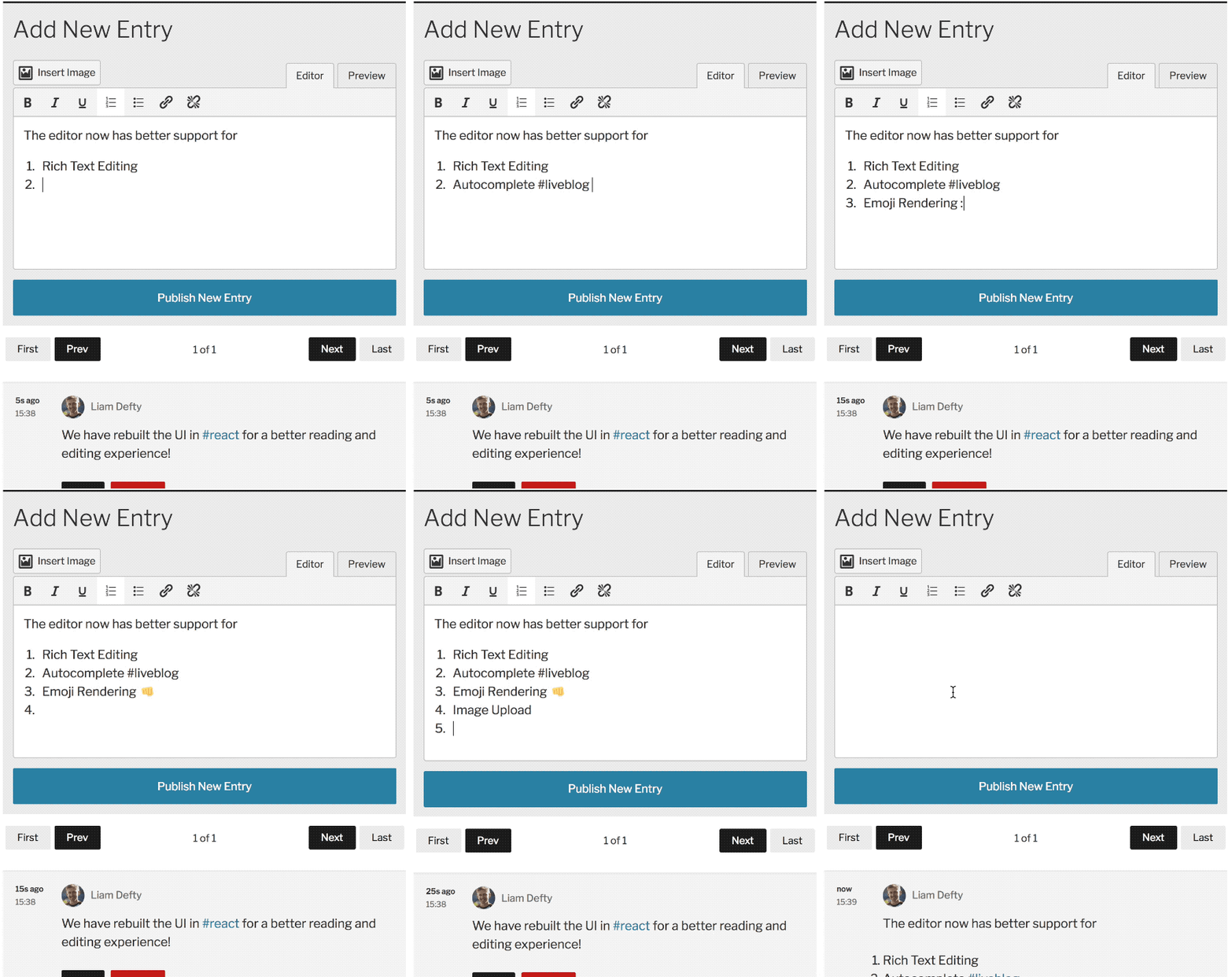
Check out the added autocomplete and emoji rendering features in action:

And it adds some of our most frequently requested enhancements:

  • A more mobile-friendly interface
  • Easier image insertion, including on mobile
  • Better formatting tools
  • Pagination of entries
  • Performance improvements for high-traffic liveblogs

Here’s a quick run-through of what’s new for editors:

And for users:

Special thanks to our development partner on the project, VIP featured partner Big Bite Creative, who with this great release have set a new foundation for continued enhancements to a critical newsroom tool.

“It’s been a rewarding few months working with the VIP team on what has been the biggest update since the original release. And it doesn’t stop here! With 1.8 already in works, we’re excited to demonstrate how easy it is to extend the new UI with some exciting new features.” said Liam Defty, Release Lead at Big Bite.

In this talk from BigWP London in December, you can hear Jason from Big Bite introduce the context behind this new release and a share a bit about what’s coming next.

If you’re a VIP client and have any questions about how to upgrade, check the Lobby post for specific instructions, or get in touch with your VIP support team.

Bugs, feature requests, and contributions are more than welcome on GitHub. And anyone can download and use the plugin via WordPress.org.